How to Use Texture Overlays to Add Realism to Digital Fabrics
Texture overlays give flat digital artwork the tactile character of cloth. By placing a scanned weave, fibre pattern, crease map, or worn surface above the base colour, designers can suggest material without modelling every thread. The result feels more credible in product mock-ups, editorial layouts, and online catalogues, especially when light appears to move across the surface.
A convincing effect comes from matching the overlay to the fabric’s construction. Woven cotton needs fine, regular intersections, while wool benefits from softer, irregular fibres. Linen usually shows slubs and slight variations in thread thickness. Applying the same grain to every material can make unrelated textiles look artificial, so each surface should reflect the physical qualities of the fabric it represents.
Australian projects benefit from testing under familiar lighting conditions. Brisbane rooms can receive hard midday sun, Melbourne interiors often have cooler, diffuse daylight, and Sydney’s coastal light can shift noticeably through the day. These conditions reveal weak textures that may disappear on a monitor but become obvious on a printed swatch or large-format display.
The most reliable workflow keeps colour, pattern, texture, and lighting separate. Each layer can then be adjusted without rebuilding the artwork. High-resolution source material, sensible blending modes, and careful attention to physical scale are essential for creating depth while preserving the clarity of the original design.
Match the texture to the fabric
Choose the visual cue that communicates the material most clearly. A woven texture should describe thread direction and intersections, whereas a brushed surface needs directional fibres and softer shadows. The method should reinforce the product rather than compete with its pattern, colour, or typography.
| Texture method | Visual result | Strongest use | Main watch-out |
|---|---|---|---|
| Scanned weave | Regular threads and visible intersections | Cotton, linen, canvas | Repetition at the wrong scale |
| Fibre noise | Fine, irregular surface variation | Wool, viscose, brushed fabric | Excessive grain resembles film noise |
| Distressed layer | Fading, rubbed areas, softened edges | Vintage or reclaimed textiles | Making new fabric look prematurely aged |
| Light and shadow map | Creases, folds, and changing depth | Upholstery and garment mock-ups | Concealing the underlying pattern |
Blend mode and opacity determine how the overlay interacts with the base artwork. Multiply strengthens dark threads and natural shadows, while Soft Light adds subtler surface variation. Overlay can create stronger contrast but needs careful adjustment to avoid crushing colours. Keep the texture selective where possible, allowing the original hue and pattern to remain recognisable.
Build layers that respond to light
Begin with a clean base-colour layer, then add the printed pattern separately. Place the texture above both so it can describe the material rather than becoming part of the motif. A good layer stack usually follows the order of colour, pattern, texture, lighting, and final adjustments.
Use masks or clipping masks to keep fibres inside the shape of the fabric. This is especially important for seams, hems, edges, and folded areas, where an unrestricted overlay can suggest loose fibres floating outside the product. Smart objects allow you to change the texture’s scale, rotation, or blending mode while retaining the original scan.
Lighting should support the texture without doing all the work. Soft shadows can make a flat panel appear gently folded, while a restrained highlight can reveal raised fibres. Avoid adding several crease maps at once, since overlapping shadows often produce a muddy or overly wrinkled surface. If the texture still reads clearly after the lighting is removed, it is probably working effectively.
Account for Australian conditions
Test each fabric in the environment where it will be used. Under bright light, increase the visibility of weave intersections and check whether shadows remain natural. In softer daylight, look for subtle texture that may otherwise vanish. Testing helps recreate how a material changes across a day rather than presenting one artificially perfect rendering.
Australian buyers are familiar with cotton and linen, making their characteristic surfaces useful reference points for digital studies. Heat-conscious apparel briefs may also involve light, breathable fabrics, while homeware projects can require durable weaves suitable for frequent use. For commercial work, check abrasion, cleaning, and lightfastness information rather than relying on visual realism alone.
Display samples at actual size and describe them using familiar Australian conventions. Specify dimensions in metres, use terms such as colour and fibre, and show both a full product view and a close detail. Independent studios selling through Melbourne design markets, Sydney maker fairs, and local online marketplaces can use these details to give customers a clearer expectation of texture before purchase.
Control colour, scale and pattern
Keep most texture overlays neutral or greyscale until the final colour has been selected. This makes recolouring predictable and prevents residual hues from mixing with the base design. If a particular effect requires coloured fibres, add that colour in a separate adjustment layer so it can be masked or toned down later.
Scale is one of the most noticeable signs of an unrealistic textile. A fine cotton weave that appears coarse will make digitally rendered furniture look oversized, while oversized fibres can make a garment seem heavy. Compare the texture with known thread dimensions or include a ruler when photographing source material. Test the same texture across several product scales to ensure it remains believable.
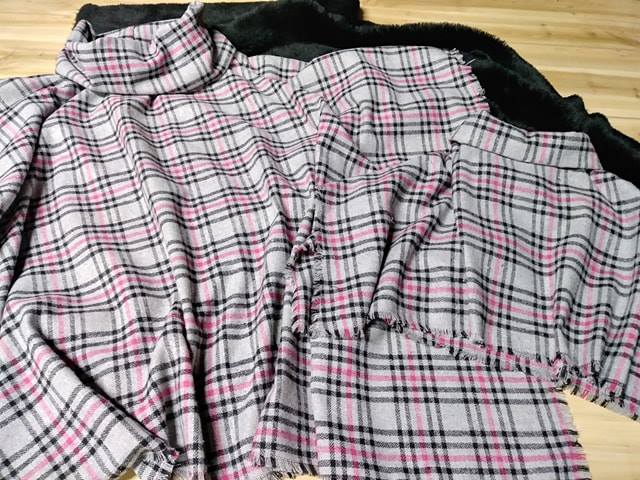
A printed pattern and a woven texture should also remain visually distinct. Printed florals may sit across the weave, whereas checks and stripes often follow the direction of the threads. Rotate the texture independently to align it with the construction, but avoid forcing every layer into perfect alignment, as natural fabrics commonly contain small irregularities.
Follow a reliable production workflow
Keep the source texture, working file, and final export separate. Duplicate the texture before making destructive edits, and retain the original at full resolution. Use adjustment layers for tonal changes so that colour corrections do not permanently alter the material scan.
Before delivery, review the design at several viewing sizes. Zoom in to inspect repeating fibres and seam intersections, then reduce the image to thumbnail size to check whether the texture still communicates the fabric. Proofing on the intended output medium is valuable because ink, fabric, and backlit displays can all affect the final appearance.
Recommendations for a dependable workflow include:
- Photograph or scan real fabric under even light, with a ruler visible for scale.
- Keep texture overlays neutral until the base colour is approved.
- Use smart objects, masks, and clipping masks for non-destructive editing.
- Check the design in full colour, greyscale, and at thumbnail size.
- Compare the texture with the fabric’s real thread direction and physical dimensions.
- Export colour-managed files and archive the original texture with the working artwork.
Create a polished fabric collection
A realistic fabric study should communicate material, construction, and use before decorative details take over. Combine large product views with close crops that reveal fibres, weave, folds, and edge finishing. Consistent lighting and a shared viewing scale make every textile in the collection feel professionally presented.
Different products can use the same underlying workflow while retaining distinct surfaces. A linen cushion, wool coat, and cotton table runner each need their own texture cues, even when their colours or patterns belong to one coordinated range. This separation gives customers confidence that the collection reflects real material differences.
When you are ready to develop the next study, open your Aurora account to sign in and continue with your fabric artwork, texture scans, colour refinements, and presentation mock-ups.