Build a responsive fabric portfolio that converts
A responsive website for your fabric portfolio should help someone move from a swatch in their hand to a confident specification. Images need to stay clear on a phone, key details must be easy to scan, and visitors need an obvious route to order a sample or request trade pricing.
Much of the first browsing will happen away from a desk. Someone might open your site after seeing a post from a Sydney showroom, save a fabric during lunch, and return on a tablet beside a worktable in Adelaide. The same content should work in every moment, with Australian dollars, GST details, metric measurements and delivery information presented without friction.
Start with the decisions behind a fabric order
Begin by identifying who needs the portfolio: homeowners choosing curtains, interior designers working on a fit-out, or upholstery tradespeople checking durability. Each visitor arrives with different questions, but all need to see the fabric clearly, understand its specifications and know how to take the next step.
The buying journey is often offline first: designers inspect hand-held swatches at Melbourne’s Paddy’s Markets or Sydney’s The Markets, then use a screen to compare references, request samples and share specifications with clients. Build that continuity into the site with consistent names for colour, fibre and intended use, plus a page that makes ordering a swatch straightforward.
Choose a platform that fits how the business will operate, rather than the most decorative template. A managed store can simplify product updates, while a custom build offers greater control. Set up analytics, backups, SSL and domain redirects before adding content. During visual research, compare DuPont’s online presence with your mood board and note which navigation, typography and image treatments support clear browsing; apply those principles without copying another company’s identity.
Design a layout that adapts without shrinking
Build from the smallest screen upward. Start with a single-column product page, let text wrap naturally and avoid fixed-width canvases. Make filters open in an accessible panel, keep the main buttons within easy thumb reach and give tap targets at least 44 by 44 pixels. A desktop layout should earn its extra columns only when the screen can accommodate them.
Use a flexible type and image system rather than separate files for every device. Fluid images with sensible crops preserve the weave and drape, while relative headings and generous line spacing keep descriptions readable. Check that the palette retains enough contrast for small text, and test long Australian product names as well as short fabric codes.
The public site also needs a dependable technical foundation. Configure a custom domain, SSL, automated backups and a useful error page before adding products. Test navigation and forms across Safari, Chrome and Android, then confirm that the mobile menu, zoom controls and sticky buttons do not hide essential details.
Show colour, texture and scale honestly
The public catalogue must replace the default HostGator guide currently occupying the portfolio domain. Once hosting and content are ready, the fabric shop should open on a finished collection rather than a login or support page.
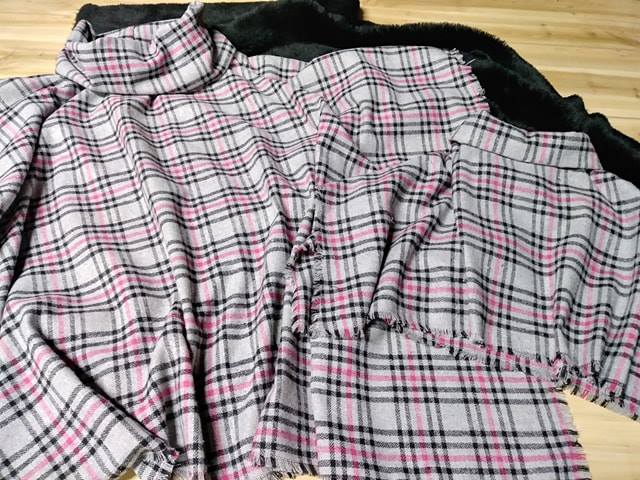
Photography does the persuasive work. Show a close crop of the weave, a wider image with a familiar object for scale and a draped view that reveals how the fabric falls. Keep lighting and white balance consistent across a collection, and avoid filters that change the colour. Add a small ruler or labelled width detail where useful, then give every image meaningful alternative text.
Naming should stay consistent from swatch card to product page, and close-up images should accompany the close-up swatch customers receive. Australian homes and workplaces face strong sun, summer heat and coastal damp, so explain any colourfastness or lightfastness results and the suitable cleaning method. A fabric that suits a shaded lounge may not suit a bright north-facing room, even when its colour code is identical.
Keep the wording Australian and plain. Write “colour” and “metre”, and use phrases such as “no worries, we’ll post it out” only when that reflects your own voice. Clear dispatch times and realistic care instructions will build more trust than forced slang or vague claims about durability.
Organise the collection for fast comparison
Filters help buyers narrow a broad collection without opening dozens of pages. Put the most useful filters near the top of a collection page and use labels that customers recognise.
- Colour and fibre groupings with clear swatch images and descriptive alternative text.
- Application filters for upholstery, curtains, cushions and commercial seating.
- Availability labels for in-stock rolls, low-stock colours and made-to-order options.
- Clear sample, retail and trade ordering, with prices in Australian dollars and GST treatment stated.
Each fabric page then needs enough detail to compare products without requesting a technical file.
- Fibre composition, weight in grams per square metre, and any backing or coating.
- Usable width in centimetres, including whether the roll can be cut across.
- Martindale abrasion rating, lightfastness result and cleaning code where available.
- Care instructions that distinguish domestic cleaning from professional upholstery cleaning.
- Sample price, minimum order, indicative lead time and delivery areas.
Search should also match the words people use when asking for a material. A visitor might type “blue linen”, “sofa fabric” or “curtain textile”, while your navigation uses a different term. Include related phrases naturally in descriptions and alternative text, and give each fabric a distinct page rather than duplicating text across colourways.
Launch, measure and invite enquiries
Test on real phones, tablets and laptops, then repeat the exercise on Australian mobile data rather than office Wi-Fi. Check image loading, filters, forms and ordering steps. Ask someone unfamiliar with the range to find a particular colour and request a swatch; their hesitation is more useful than a perfect internal walkthrough.
Keep the enquiry path simple. Place an “Order a sample” action beside the relevant fabric and a “Request trade pricing” action in the header. Confirm that forms reach an inbox someone checks, write a plain privacy notice, and offer a phone contact for trade customers who would rather speak to a person during business hours.
Use analytics to track which collections lead to sample orders, not just page views. Compare enquiry rates across screen sizes, watch which filters are used and record questions that require clarification. That evidence helps you prioritise changes rather than redesigning every page whenever a small visual detail feels distracting.
Choose three fabrics, photograph them consistently and publish the first mobile-first collection page this week. Give the page one unmistakable sample-ordering action, keep it visible above the fold on every screen and launch with a clear route for trade enquiries.