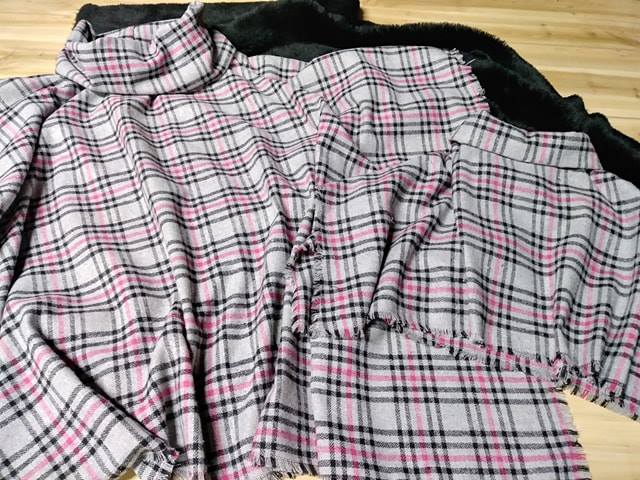
Creating a Custom Color Palette for a Fabric Collection With Code
A fabric collection becomes easier to recognise when its colours work as a deliberate system rather than a set of attractive individual swatches. A considered palette can guide textile prints, woven grounds, labels, online product photography and the way fabrics are grouped for Australian customers.
Code makes this process repeatable. Instead of choosing every shade by instinct, you can define a few anchor colours, generate related tones, test contrast and export consistent values for design software or a website. The result is a palette with creative character and a practical structure.
| Method | Strengths | Limitations | Useful for |
|---|---|---|---|
| Manual swatch selection | Intuitive and tactile | Can become inconsistent | Early moodboarding |
| HSL or HSV code generation | Fast, adjustable and repeatable | Needs visual checking | Tints, shades and variations |
| Image-based sampling | Connects colours to references | May include muddy or accidental tones | Landscape and lifestyle inspiration |
| Contrast testing | Improves readability and accessibility | Does not replace aesthetic judgement | Product pages, labels and lookbooks |
Begin with a clear colour strategy
Start by defining the emotional and commercial role of the collection. A coastal range might use chalky blue, warm sand and muted green, while a winter upholstery range could centre on charcoal, rust, cream and deep eucalyptus. The palette should reflect the fabric’s intended setting, such as a relaxed Melbourne apartment, a bright Brisbane home or a country property outside Adelaide.
Use three layers to create structure: foundation colours, supporting colours and accents. Foundation colours usually occupy the largest printed or woven areas. Supporting colours create variation without competing with them, while accents add energy to a border, small motif or hero design. A practical collection often contains five to eight core colours, with several generated variations for production and digital use.
Australian light can affect how colours appear. Strong northern sunlight may make pale fabrics look brighter, while warm indoor lighting in Sydney or Perth can push beige, terracotta and cream towards yellow. Always assess printed strike-offs or woven samples in realistic conditions instead of relying solely on a screen.
Choose colour values that code can control
Hex values are convenient for web design, but HSL and HSV are often easier for palette generation. In these models, hue describes the colour family, saturation controls intensity and lightness or value adjusts how light or dark the result appears. Changing one variable at a time helps preserve harmony across a collection.
For example, a base hue of 32 degrees may produce a warm ochre. Lowering saturation can create a dusty version for a background fabric, while reducing lightness creates a deeper tone for piping or a larger motif. This controlled approach is more reliable than repeatedly adding white or black, which can make some colours appear flat or grey.
A short Python script can generate a family of related colours from one starting value:
import colorsys

def make_palette(hex_code, light_steps=(0.18, 0.32, 0.48),
                 dark_steps=(0.62, 0.48, 0.36)):
    hex_code = hex_code.lstrip("#")
    red, green, blue = (
        int(hex_code[i:i + 2], 16) / 255 for i in (0, 2, 4)
    )

    hue, saturation, value = colorsys.rgb_to_hsv(red, green, blue)
    palette = {"base": hex_code.upper()}

    for index, amount in enumerate(light_steps, 1):
        rgb = colorsys.hsv_to_rgb(hue, saturation * 0.82, amount)
        palette[f"light_{index}"] = "#" + "".join(
            f"{round(channel * 255):02X}" for channel in rgb
        )

    for index, amount in enumerate(dark_steps, 1):
        rgb = colorsys.hsv_to_rgb(hue, min(saturation * 1.12, 1), amount)
        palette[f"dark_{index}"] = "#" + "".join(
            f"{round(channel * 255):02X}" for channel in rgb
        )

    return palette

print(make_palette("#B86F45"))
This produces a base colour with lighter and darker alternatives. For fabric design, treat the output as a starting point rather than a final production specification. Ink, dye, yarn, paper and monitor displays interpret colour differently, so physical sampling remains essential.
Build relationships between fabric colours
A strong palette needs more than light and dark versions of one hue. Add complementary, analogous or split-complementary colours to create visual movement. An earthy orange can sit beside blue-green, while a soft green may gain warmth from clay, apricot or faded coral.
When working with a collection such as Aurora Design Fabrics, think about how the colour system would operate across multiple fabric types. A small-scale geometric print may carry the strongest accent, a plain weave may provide the neutral foundation and a floral or large-scale pattern can combine several supporting colours.
Code can calculate colour relationships by rotating the hue around the colour wheel. A complementary colour is generally 180 degrees away, while analogous colours may sit 20 to 40 degrees apart. The mathematics is simple, but the visual result still needs judgement because equal numerical spacing does not always create equal perceived intensity.
def rotate_hue(hex_code, degrees):
    hex_code = hex_code.lstrip("#")
    rgb = [int(hex_code[i:i + 2], 16) / 255 for i in (0, 2, 4)]
    hue, saturation, value = colorsys.rgb_to_hsv(*rgb)

    new_hue = (hue + degrees / 360) % 1
    new_rgb = colorsys.hsv_to_rgb(new_hue, saturation, value)

    return "#" + "".join(
        f"{round(channel * 255):02X}" for channel in new_rgb
    )

print(rotate_hue("#B86F45", 180))
Try several rotations and reduce saturation where the result feels too vivid. Australian interiors often favour natural, softened colours that work with timber, stone, linen and greenery, so a mathematically perfect complementary pair may need to be toned down before it feels suitable for the local market.
Test contrast, texture and real-world use
Colour contrast matters when a collection appears in product listings, swing tags, care labels and social media graphics. A beautiful palette can become difficult to use if a pale text colour disappears against a light fabric photograph. Calculate relative luminance or use a contrast-checking library before assigning colours to text and interface elements.
Texture also changes perception. A brushed cotton surface scatters light differently from satin, velvet or tightly woven linen. A red that appears rich on a smooth screen image may look darker in a textured upholstery cloth. Test the palette on the actual substrate, preferably under daylight and common warm-white interior bulbs.
Create digital mock-ups showing the fabrics together in realistic proportions. A palette may appear balanced when each colour occupies an equal square, then feel overwhelmingly dark when the charcoal print covers half a cushion. Test common applications such as curtains, cushions, quilts, lampshades and occasional chairs.
For design research, visual references can come from architecture, packaging, gardens and transport systems. Even a metro map reference can demonstrate how many distinct hues may coexist while remaining easy to distinguish. Translate that lesson into fabric groupings by giving each colour a clear role and sufficient separation from its neighbours.
Turn the palette into a repeatable production system
Store every colour with a useful name, hex value, RGB value and, where relevant, CMYK or a textile standard reference. Names such as “gum leaf”, “sunbaked clay” and “storm blue” can help a creative team communicate, but numerical values are necessary for consistent digital reproduction. Keep the original base colours separate from generated tints and shades.
Use a simple data file such as JSON to connect the palette with a website, catalogue or internal design tool:
{
  "collection": "Coastal Gum",
  "colours": [
    {"name": "Eucalyptus", "hex": "#71856C", "role": "foundation"},
    {"name": "Sandstone", "hex": "#D6B995", "role": "supporting"},
    {"name": "Rust Bloom", "hex": "#B65E3C", "role": "accent"},
    {"name": "Deep Tide", "hex": "#254E59", "role": "grounding"}
  ]
}
A controlled naming and export system reduces errors when a collection moves from sketchbook to sample room, online shop and trade presentation. It also helps collaborators in Melbourne, Sydney, Brisbane or regional studios refer to the same colour without relying on subjective descriptions.
Keep the following practices in the workflow:
- Define one dominant colour, two or three supporting colours and one accent before generating variations.
- Save the base hex values and the code used to create every derivative shade.
- Check contrast for text, labels, buttons and catalogue layouts before publication.
- Compare screen colours with printed or woven samples under Australian daylight.
- Record colour names, production references and intended fabric roles in one shared file.
A custom palette becomes most valuable when it can be reused across a full collection. Export swatches for design software, generate CSS variables for digital pages and prepare a concise colour sheet for printers, manufacturers and retail partners. Begin with one anchor colour, run the palette generator, test the resulting fabrics in real spaces and develop the collection from evidence as well as instinct.